


When launching an acquisition campaign, the choice of channel is crucial, but the ad placement choice It is just as much. The same visual will not have the same impact depending on whether it appears in a news feed, in the middle of a GPS journey or during vertical scrolling.
To help you calibrate your creatives and media plan, here is the complete directory of formats and placements available across the 10 advertising platforms we use most at the agency.
Contents
1. YouTube: Video domination
On YouTube, your ads fit right into the viewing experience, whether on mobile, computer or connected TV.
- In-Stream (Skippable or Non-skippable): The classic advert that plays beforePre-roll), during (Mid-roll) or after (Post-roll) the main video.
- YouTube Shorts Vertical ad (9:16) that integrates smoothly between two organic Shorts.
- In-Feed (ex-Discovery): Sponsored thumbnail displayed in YouTube search results, on the mobile home page or in the suggestion column.
- Masthead banner: Massive impact format booked in advance, covering the top of the YouTube homepage (ideal for TV and desktop for brand awareness).

Here are the recommended dimensions and technical specifications for the various YouTube ad placements.
It is important to note that YouTube, as part of Google Ads, adapts in a responsive manner. However, to guarantee the best visual quality across all devices (mobile, computer, connected TV), it is strongly advised to provide the files in the highest possible resolution.
Overall Summary (Universal Video Specifications)
For the majority of video formats, these basic rules apply:
- File format: .MP4 (recommended), .MOV, .AVI.
- Recommended resolution: 1080p (Full HD) or higher.
- Maximum file size: 256 GB.
In-Stream (Skippable or Non-Skippable)
It is the classic horizontal format that adapts to the standard YouTube video player.
| Specification | Recommendation |
| Dimensions (Resolution) | 1920 × 1080 pixels (16:9 – Full HD Landscape) |
| Minimum dimensions | 1280 × 720 pixels (720p HD) |
| Other ratios accepted | 1:1 (Square – 1080×1080) or 9:16 (Vertical) are accepted, but 16:9 is the standard for this placement. |
| Companion banner (Optional, desktop only) | 300 × 60 pixels (Static JPG/GIF/PNG image, <150 KB) |
YouTube Shorts
It is the purely vertical format, designed for the full-screen mobile experience.
| Specification | Recommendation |
| Dimensions (Resolution) | 1080 × 1920 pixels (9:16 – Vertical Full HD) |
| Minimum dimensions | 720 × 1280 pixels (720p) |
| Recommended duration | Under 60 seconds (to fit in naturally among organic Shorts). |
In-Feed (ex-Discovery)
This format behaves more like a content suggestion. It requires a thumbnail (still image) and text elements. The video itself starts when the user clicks on it.
| Specification | Recommendation |
| Video format (Resolution) | Same specifications as the In-Stream (1920×1080) as the video will play in the standard player after the click. |
| Thumbnail | 1280 × 720 pixels (16:9). JPG, GIF, or PNG < 2 MB. |
| Title | Maximum 100 characters. |
| Description | 2 lines of 35 characters maximum each. |
Masthead banner
This format is a pre-booked «impact purchase» and is displayed differently depending on the device to cover the entire top of the homepage. It is an autoplaying YouTube video (without sound) with accompanying elements.
| Device | Key Specifications |
| Desktop computer | Aspect ratio 16:9. The video takes up the left side, while information and call-to-action elements occupy the right. |
| Smart TV | Aspect ratio 16:9. The video takes up the whole background with the info superimposed. The resolution 1920×1080 is essential. |
| Mobile | Aspect ratio 16:9 (or native video ratio). The video is at the top with title/description below. |
| General | The video must be hosted on YouTube. Autoplay is limited to a maximum of 30 seconds. |
2. Google Maps: The Drive-to-Store Lever
Essential for driving physical footfall to a point of sale or promoting a network of dealerships/stores.
There are currently 4 ways to run ads on Google Maps. You can run advertising on the map itself through the sponsored markers, in the search bar with the Maps search ads and the Maps suggestion ads, as well as on business profiles when a user clicks on an associated business. Find more details on each ad type below.
Sponsored markers (Sponsored pins)
Sponsored pins are one of the most common ways to advertise in Google Maps. You will find them in the form of square pins directly on the map. This allows them to stand out from the usual round pins.
If you create a Performance Max campaign for in-store goals, sponsored pins will display your logo. If you use a Smart campaign, the pin will display the type of business you run or a generic icon corresponding to that business category.
Sponsored landmarks appear in several ways, including:
- When a user browses the map
- When a user performs a search
- Along the route in the «Routes» view»
- Periodically during active navigation in driving mode
Sponsored pins are charged either per view or per click, depending on the type of campaign.
Maps search adsMap search ads)
Maps search ads are another common way to advertise on Google Maps. When a user performs a search, your ad appears at the top of the map search results list. This may include corresponding promoted pins on the map as well as business information, including your address, contact details and directions.
Important: To use Maps search ads, you must have associated location assets.
Maps search ads are compatible with Search campaigns, Performance Max campaigns for in-store goals, Smart campaigns and Shopping campaigns.
Maps suggestion announcementsMap suggested ads)
Maps suggestion ads are another way of advertising in Google Maps search results. When a user enters a search, suggestion ads appear as an autocomplete proposal. This allows you to influence the user's choice by being the first option they see. These ads only appear on the Google Maps mobile app.
To use Maps suggestion ads, you must run either a Performance Max campaign for store goals, a Smart campaign, or a Search Network campaign.
Ads on Business ProfilesPlacesheet ads)
Ads on Business Profiles are integrated into the details page that appears after selecting a location on the map. This may include items such as:
- Booking modules (for example, an hotel advertisement)
- Ads for related properties (a shop located in a shopping centre featured on the shopping centre page)
- «To do / Activities» announcements» (sightseeing, nearby activities)

Here are the dimensions and technical specifications for the 4 types of placements. Unlike a traditional «newsfeed» (like on Meta or LinkedIn) where you provide a static image, Google Maps ads are «Responsive Display Ads or some «Local Classifieds».
This means that Google dynamically drafts the advert using the elements you provide (images, logos, titles, descriptions) to adapt it perfectly to the user's device, available space and format (card, search bar, listing).
Global Technical Dimensions (For all Maps placements)
For Google to be able to create these ads, you need to provide high-quality assets in these standard ratios.
| Asset type | Aspect Ratio | Recommended Dimensions (Minimum) | Specifications |
|---|---|---|---|
| Landscape image | 1.91:1 Landscape | 1200 × 628 pixels (Min 600x314px) | Max weight: 5 MB. Formats: JPG, PNG. |
| Square Image | 1:1 Square | 1200 × 1200 pixels (Min 300x300px) | Max weight: 5 MB. Formats: JPG, PNG. |
| Logo | 1:1 Square | 1200 × 1200 pixels (Min 128x128px) | Max weight: 5 MB. Formats: JPG, PNG. Transparency recommended. |
| Video (Optional) | 16:9, 1:1, 4:5, 9:16 | N/A (Standard HD) | The video must be hosted on YouTube. |
Dimensions by Specific Placement Type
Google Ads then assembles these elements depending on the placement:
1. Sponsored Pins
The advert appears directly on the map in the form of a customised pin, often a logo. This is the most visually prominent placement.
- Main visual: The advertisement uses your Logo (1:1) to create the pin on the map. When the user clicks, a reduced business profile opens, displaying a Image (1.91:1 or 1:1) compiled with the title and description.
- Dimensions: Dynamic. The card image adjusts to be clear without obscuring the map.
2. Search bar: Search Ads
The advert appears at the top of the search results when the user types a keyword (e.g. «Italian restaurant Anthy»).
- Main visual: Most of the time, there is no image displayed in the list of results itself, just the title, the rating, the distance and a small thumbnail of Logo (1:1). However, a compiled image (1.91:1 You 1:1) may be displayed in certain contexts on mobile.
- Dimensions: Mainly based on the text, with a small logo square of At least 128×128 pixels.
3. Search bar: Auto-suggest Ads
It is a proactive placement. The ad appears as a suggestion in the drop-down list before the user has even finished typing their search.
- Main visual: It is a streamlined format. It generally displays your Logo (1:1) next to your suggested establishment name. There is no content image here, to guarantee maximum loading speed.
- Dimensions: Based on the logo icon of At least 128×128 pixels.
4. Business Profile Ads
The advert appears on the listing of another business, often a competitor or a complementary shop. This is contextual impact placement.
- Main visual: This investment uses a Landscape image (1.91:1) or a Square Image (1:1) to grab attention. The advert is made up of an image, a title, a description and often a CTA button.
- Dimensions: Dynamic, the advertisement fits as a clear banner within the content of the listing.
In summary: You must provide high-quality images in 1.91:1 Landscape, 1:1 Carré, and a 1:1 Logo, and Google takes care of writing the ads for the 4 placements.
3. Google Search: Pure intent capture
The search network targeting users in the active purchase phase.
- Top and bottom text ads: The traditional sponsored links located above or below Google's organic results.
- Shopping Ads (Product Listing Ads): Visual product listings (image, price, merchant name) displayed in a carousel right at the top of the results.
- Ad extensions: Sitelinks, forms, telephone numbers and images integrated beneath your text adverts.

Here are the detailed dimensions and technical specifications for Google Search ad placements. These formats are designed to integrate seamlessly into search results on mobile and desktop.
Dimensions by Specific Placement
1. Text Ads (Top & Bottom)
This is the classic format for sponsored links. It is purely text-based, but its dimensions are governed by strict character limits for Titles and Descriptions.
| Element | Visual Specification / Character Limit |
| Headings (Headline) | Until 30 characters by title. You can provide up to 15, Google will display 2 or 3 separated by a vertical bar (` |
| Descriptions (Description) | Until 90 characters per description. You can provide up to 4, Google will show 1 or 2. |
| Path (Path) | Until 15 characters by path. Two paths are available after the URL (e.g. [www.vitesite.com/Chemin1/Chemin2](https://www.vitesite.com/Chemin1/Chemin2)). |
2. Shopping Ads (Product Listing Ads – PLA)
This visual format, ideal for e-commerce, is displayed as a carousel. It is generated from your product catalogue via Google Merchant Center.
| Listing type | Aspect Ratio | Recommended Dimensions |
| Standard Product Image | 1:1 (Square) | 1000 × 1000 pixels (minimum 500x500px). Please use a white background. |
| 4:5 (Portrait mobile) | 1000 × 1250 pixels immersive mobile format. | |
| Product Video (Optional) | N/A (Responsive) | The videos produced on Shopping adapt in a responsive way to the player. Optimise for standard ratios (16:9, 1:1, 4:5). |
- Shopping Technical Notes: Maximum image weight 16 MB. White or transparent background compulsory for the main image. No text, watermark or logo superimposed on the main product image.
3. Ad extensions
Extensions enhance your text ads with additional information. Some include images or specific formats.
| Extension Element / Type | Aspect Ratio | Recommended Dimensions |
| Image (Extension/Asset) | 1:1 (Square – Mandatory) | 1200 × 1200 pixels (minimum 300x300px). |
| 1.91:1 (Landscape – Optional) | 1200 × 628 pixels (minimum 600x314px). | |
| Sitelinks | N/A (Responsive text) | Text wraps. Recommended: Title < 25 chars., Description < 35 car. (x2). |
| Call extensions | N/A (Responsive number) | Google dynamically inserts the telephone number. |
| Other Extensions | N/A (Responsive text) | Forms, telephone numbers and images adapt below the text ad. Use standard ratios (16:9, 1:1, 4:5) for the media. |
4. Google Performance Max: AI-Driven Advertising Optimisation
Performance Max (PMax) campaigns are transforming advertising management by relying on artificial intelligence to maximise your results across all Google channels.
Using a diverse pool of assets (images, videos, logos and text), PMax dynamically assembles the most relevant ad for each user at the ideal moment.
This automated approach allows multi-channel distribution (YouTube, Search, Display, Maps, Gmail) without the need to create multiple distinct campaigns.
To succeed, it is crucial to provide a wide variety of high-quality creative components, thereby giving the AI a broad range of possible combinations to optimise your conversions.

Performance Max campaigns are automated and run across all Google channels (YouTube, Display, Search, Discover, Gmail, Maps) from a single asset group.
Unlike fixed single formats, you must provide a maximum number of different components so that Google's AI can assemble the best-performing ad for each placement.
| Component Type | Specifications and Required Quantities | Recommended Dimensions (pixels) / Limits |
| Images | Mandatory: 1 Landscape (1.91:1) AND 1 Square (1:1). Recommended: Up to 20 varied images. | Landscape 1200 × 628 Square: 1200 × 1200 Portrait (optional 4:5): 960 × 1200 |
| Logos | Mandatory: 1 Square (1:1). Recommended: Up to 5 logos (square and landscape). | Square: 1200 × 1200 (min 128×128) Landscape (4:1): 1200 × 300 (min 512×128) |
| Videos | Optional (but strongly recommended): Up to 5 videos. Note: If absent, Google can automatically generate a video from your images. | Ratio: 16:9, 1:1, or 9:16. Duration: 10 seconds minimum. Format YouTube Link. |
| Headings (Text) | Provide from 3 to 15 distinct titles. | 30 characters maximum by title. |
| Long Titles (Text) | Provide 1 to 5 long titles. | 90 characters maximum by long title. |
| Descriptions (Text) | Provide 2 to 5 descriptions. Note: At least one must be under 60 characters. | 90 characters maximum 60 characters max (short) |
Creative Advice: The strength of a PMax ad depends on the diversity and quality of the assets provided. The more you vary the angles (promotions, benefits, brand images) and formats, the more combinations the AI has to optimise your conversions.
Image/Logo file size: Maximum 5 MB, JPG or PNG formats.
5. Facebook: Multi-format versatility
Meta's inventory offers massive reach via the historical social network.
- Feed (Desktop & Mobile): The standard placement for videos, carousels or single images.
- Stories & Reels : High-engagement vertical full-screen formats (9:16).
- Straight columns (Desktop only): Dark mode on the desktop version of Facebook.
- Marketplace Advertisements inserted into the consumer-to-consumer shopping feed.
- Messenger inbox : Inbox banners or sponsored messagesClick-to-Messenger).
6. Instagram: The visual and aspirational showcase
Focused on aesthetics, branding and direct e-commerce conversion.
- Feed & Profile: Banners, videos and carousels integrated into the main feed or on public profiles.
- Stories: High-converting vertical ephemeral formats (Swipe-up buttons / Links).
- Reels The king format for capturing attention with immersive and dynamic video content.
- Explore tab: Your ads appear to users who are discovering new content targeted to their interests.

Here are the recommended dimensions and ratios for Meta advertising placements (Facebook, Instagram, Messenger).
For optimal quality across all screens (mobile, desktop), it is always advisable to use the highest possible resolutions that respect the requested ratios.
Global Summary (Meta Universal Standards)
If you need to create assets without knowing the exact placement, here are the two ratios to prioritise:
- Square format (1:1): Ideal for versatility (Feed, Marketplace, Messenger).
- Full Screen Vertical Format (9:16): Essential for mobile Stories and Reels.
Dimensions by Specific Placement
1. News Feed (Desktop & Mobile)
This is the most flexible placement, adapting to several image and video formats.
| Content Type | Recommended Ratio | Recommended Dimensions |
| Unique image / Video | 4:5 (Portrait mobile) | 1080 × 1350 pixels |
| 1:1 (Square) | 1080 × 1080 pixels | |
| 1.91:1 (Landscape) | 1200 × 628 pixels | |
| Carousel (Image or Video) | 1:1 (Square) | 1080 × 1080 pixels |
- Note: The 4:5 format performs best on mobile because it takes up more space on the screen while scrolling. The 16:9 format (classic landscape) is accepted but not recommended as it is too small on mobile.
2. Stories & Reels
Purely vertical formats designed for an immersive full-screen mobile experience.
| Content Type | Recommended Ratio | Recommended Dimensions |
| Vertical full screen | 9:16 | 1080 × 1920 pixels |
- Safe Zone: Leave approximately 14% (250 pixels) at the top (profile area) and at the bottom (CTA/caption area) free of text or prominent logos to prevent them from being obscured by the interface.
3. Straight columns (Desktop only)
Classic display format, appearing only on the desktop version.
| Content Type | Recommended Ratio | Recommended Dimensions |
| Unique Image / Carousel | 1:1 (Square) | 1080 × 1080 pixels (minimum 254x133px) |
4. Marketplace
Ads inserted between organic buy/sell posts.
| Content Type | Recommended Ratio | Recommended Dimensions |
| Unique Image / Carousel | 1:1 (Square) | 1080 × 1080 pixels |
5. Messenger messaging
Banners appear in the primary inbox of the mobile app.
| Content Type | Recommended Ratio | Recommended Dimensions |
| Unique Image (Inbox) | 1:1 (Square) | 1080 × 1080 pixels |
| Unique Image (Link/Landscape) | 1.91:1 (Landscape) | 1200 × 628 pixels |
- Note: For Click-to-Messenger ads, assets must follow the dimensions of the placement where they are shown (Feed or Stories).
7. Spotify: Sonic and visual immersion
To reach an engaged target audience during screen-free consumption moments (driving, working out, working).
- Audio Ads: 15 to 30-second audio spots broadcast between tracks, accompanied by a clickable banner on the screen.
- Video Takeover Video played only when the app is active on screen (while the user is searching for music).
- Overlay & Homepage Overlay: Impact banners on opening the desktop or mobile app.
- Playlist sponsorship: Brand integration at the top of popular themed playlists.

Here are the detailed dimensions and technical specifications for advertising placements on Spotify. These formats are designed to capture the user's attention on mobile and desktop.
Overall Technical Summary (Common Recommendations)
For all visual elements, these rules apply to guarantee good quality on all screens:
- File format: JPEG or PNG (recommended for transparency).
- Maximum file size: Generally 200 KB for images, 500 MB for videos.
Dimensions by Specific Placement
1. Audio Ads
Audio spot accompanied by a single clickable banner (Companion Image).
| Element | Ratio / Specification | Recommended Dimensions |
| Audio (15-30 secs) | MP3 / WAV (Bitrate > 192kbps) | – |
| Clickable banner Companion | 1:1 (Square) | At least 600 × 600 pixels Standard |
- Note: Spotify Ad Studio sometimes recommends 640×640 pixels.
2. Video Takeover
Full-page video played only when the user is active on the app. It is accompanied by a clickable end card (Branded End Card).
| Element | Ratio / Specification | Recommended Dimensions |
| Video (15-30 secs) | 9:16 (Vertical) | HD 720 × 1280 pixels (or similar portrait) |
| End visual (End Card) | 1:1 (Square) | 640 × 640 pixels (recommended) |
3. Overlay & Homepage Overlay
Full-screen banners displayed when opening the app. They are purely visual and clickable.
| Device | Ratio / Specification | Recommended Dimensions |
| Mobile Overlay | Vertical Full Screen | 630 × 920 pixels |
| Desktop Overlay | Specific format | 800 × 435 pixels |
4. Playlist Sponsorship
Brand integration at the top of popular themed playlists. It requires several assets for both desktop and mobile versions.
| Item / Device | Ratio / Specification | Recommended Dimensions |
| Playlist Header (Desktop) | Horizontal banner | At least 1200 × 350 pixels |
| Brand logo (All versions) | Transparent format | 640 × 640 pixels (1:1 standard) |
- Note: The mobile header generally adjusts responsively based on the brand elements.
8. TikTok: Native and entertaining engagement
The ecosystem where advertising has to look as much like organic content as possible«Don't Make Ads, Make TikToks»).
- In-Feed Ads: Vertical videos appearing naturally in the feed «For you».
- TopView The first video the user sees when opening the app (premium, high-impact format).
- Branded Mission / Hashtag Challenge : Sponsored placements encouraging the community to create content around your brand.
- Sponsored effects/filters: Integration of your brand into the TikTok camera effects gallery.

Here are the detailed dimensions and technical specifications for the main advertising placements on TikTok. These formats are designed to integrate smoothly into the app's vertical and immersive user experience.
Global Technical Summary (Common Specifications)
To ensure the best quality across all screens, these basic rules apply to all video placements:
- File format: .MP4, .MOV, .MPEG, .3GP, or .AVI.
- Aspect ratio: 9:16 (Vertical) is the absolute standard and the best performing. (The 1:1 Square format is accepted but less immersive).
- Resolution: HD (At least 720 × 1280 pixels, recommended: 1080 × 1920 pixels).
- Maximum file size: 500 MB.
- Recommended codecs: H.264 (video), AAC (audio).
Dimensions by Specific Placement
1. In-Feed Ads
Vertical videos that appear naturally in the For You feed, mixed in with organic content.
| Element | Ratio / Specification | Recommended Dimensions |
| Video (5-60 sec) | 9:16 (Vertical) | 1080 × 1920 pixels (HD recommended) |
| Safety Zone Safe Zone | Leave approximately 14% (250 pixels) at the top (profile area) and 14% (250 pixels) at the bottom (CTA/caption area) free of text or prominent logos to prevent them from being obscured by the interface. | – |
- Note: TikTok recommends a length of 9 to 15 seconds for best performance, even though the maximum is 60 seconds.
2. TopView
Premium, high-impact format. This is the first video the user sees when opening the app. It is full-screen and plays without interruption.
| Element | Ratio / Specification | Recommended Dimensions |
| Video (5-60 sec) | 9:16 (Vertical Full Screen) | 1080 × 1920 pixels |
| Maximum file size | 500 MB | – |
- Note: The TopView format is particularly powerful as it captures attention from the very first second.
3. Branded Mission / Hashtag Challenge
These placements encourage the community to create content around your brand. They require multiple assets for the desktop and mobile versions.
| Item / Device | Ratio / Specification | Recommended Dimensions |
| Challenge Vignette (Mobile) | 3:4 (Portrait) | 400 × 533 pixels |
| Brand logo (All versions) | Transparent format | 128 × 128 pixels (1:1 standard) |
- Note: These challenges are designed to maximise community engagement and participation.
4. Sponsored effects/filters
Integration of your brand into the TikTok camera effects gallery, where users can apply effects to their own videos.
| Element | Ratio / Specification | Recommended Dimensions |
| Effect Icon (Gallery) | Transparent format | 128 × 128 pixels (1:1 standard) |
- Note: These effects allow a playful and creative integration of the brand into user-generated content.
9. LinkedIn: Precision B2B targeting
Ideal for qualified lead generation and corporate communication.
- Sponsored Content : Sponsored posts (Image, Carousel, Video, PDF Document) directly in the professional feed.
- Message Ads & Conversation Ads : Private messages sent directly to the inboxes of targeted decision-makers.
- Text Ads & Dynamic Ads : Subtle small banners in the right-hand column on desktop, personalised with the member's profile picture.
- Thought Leader Ads Sponsorship of a post written by an employee or a leader from their personal profile.

Here are the recommended dimensions and ratios for LinkedIn ad placements. These specifications are crucial to maximise visibility and engagement, particularly for qualified lead generation.
LinkedIn adapts in a responsive way depending on the device, but it is still advisable to use the highest possible resolutions that respect the requested ratios to guarantee optimal quality.
Dimensions by Specific Placement
1. Sponsored Content (News feed)
This is the most common and versatile placement, appearing directly in the professional feed.
| Content Type | Recommended Ratio | Recommended Dimensions |
| Unique Image | 1:1 (Square) | 1200 × 1200 pixels |
| 1.91:1 (Landscape) | 1200 × 628 pixels | |
| 4:5 (Portrait mobile) | 1200 × 1500 pixels | |
| Carousel (Images) | 1:1 (Square) | 1080 × 1080 pixels |
| Video | 16:9 (Landscape) | 1920 × 1080 pixels |
| 1:1 (Square) | 1080 × 1080 pixels | |
| 9:16 (Vertical) | 1080 × 1920 pixels | |
| PDF document | N/A (Responsive) | The recommended size is < 100 MB, standard US Letter or A4 format (portrait) is ideal. The document will adjust to the LinkedIn reader. |
- Note: The 4:5 image format performs best on mobile because it takes up more space on the screen when scrolling. The 16:9 format is accepted for images but not recommended as it is too small on mobile. For video, the 1:1 ratio is an excellent mobile/desktop compromise.
2. Message Ads & Conversation Ads (Messaging)
These formats are based on text and visual elements in the inbox.
| Listing type | Companion Banner Dimensions (Optional) | Other Specifications |
| Message Ads | 300 × 250 pixels (desktop only) | Ad image size: < 2 MB, Aspect ratio: < 2:1 |
| Conversation Ads | 300 × 250 pixels (desktop only) | N/A for the message text. |
- Note: The companion banner is only visible on a computer. If the user views their message on mobile, it will not appear. The sender icon must be a valid LinkedIn profile photo (standard 1:1).
3. Text Ads & Dynamic Ads (Desktop right-hand column only)
These banners are small in size and only appear on the desktop version.
| Listing type | Image/Logo Dimensions | File size |
| Text Ads | 100 × 100 pixels | < 2 MB |
| Dynamic Ads | 100 × 100 pixels (for the company logo or custom profile picture) | < 2 MB |
- Note: For Dynamic Ads, the member's image (profile picture) is inserted dynamically from their LinkedIn profile; the advertiser only needs to provide the company logo or a generic 100x100px image.
4. Thought Leader Ads
This is a specific Sponsored Content format, sponsoring an existing post by a natural person (an employee or a manager).
| Listing type | Specifications |
| Thought Leader Ads | The dimensions are exactly the same as for the Sponsored Content standard, as it is an existing post that is being boosted. The recommended ratios are therefore 1:1, 16:9, or 4:5 for the accompanying image or video. |
- Note: The author's profile picture is used as the ad icon. There are no specific dimensions to provide; you must ensure that the original post contains high-quality media respecting standard LinkedIn ratios.
10. Pinterest: Inspiration and product discovery
A hybrid platform bridging a social network and a visual search engine, perfect for e-commerce and home decor/fashion/real estate.
- Sponsored Pins (Home feed): Simple images or videos integrated into the users' idea stream.
- Ads in search results: Placements targeting keywords entered by users actively seeking inspiration.
- Carousels & Collections : Formats for presenting multiple products or a full range in a single Pin.
- Shopping Ads Automatic import of your product catalogue to turn pins into direct shopping pages.

Here are the recommended dimensions and ratios for the main Pinterest ad placements. These specifications are essential to guarantee optimal visibility across all devices, particularly on mobile, where the platform is predominantly browsed.
Overall Technical Summary (Common Recommendations)
To guarantee the best quality on all screens, these basic rules apply to all visual elements:
- File format: PNG or JPEG (recommended for transparency and image clarity).
- Maximum file size: 10 MB (Images), 2 GB (Videos).
Dimensions by Specific Placement
1. Sponsored Pins (Home feed)
This is the most common and highest-performing placement, integrating naturally into the users' flow of ideas.
| Content Type | Recommended Ratio | Recommended Dimensions |
| Unique Image | 2:3 (Portrait) | 1000 × 1500 pixels |
| 1:1 (Square) | 1000 × 1000 pixels (less immersive) | |
| Video | 2:3 (Portrait) | 1080 × 1620 pixels |
| 9:16 (Vertical Full Screen) | 1080 × 1920 pixels immersive | |
| 1:1 (Square) | 1080 × 1080 pixels |
- Note: The 2:3 format is the absolute standard on Pinterest because it takes up more space on the screen during mobile scrolling. Horizontal formats are not recommended as they are too small.
2. Ads in search results
These banners are small in size and only appear on the desktop version, actively targeting keywords entered by users.
| Item / Device | Ratio / Specification | Recommended Dimensions |
| Search Result Ad (Desktop) | Square (1:1) | 1000 × 1000 pixels (minimum 300x300px) |
| Image/Logo (optional) | 1:1 (Standard) | 100 × 100 pixels (dynamically inserted) |
3. Carousels & Collections
These formats make it possible to present several products or a full range in a single Pin, encouraging people to discover your catalogue.
| Element / Placement | Ratio / Specification | Recommended Dimensions |
| Carousels (Images) | 1:1 (Square) | 1080 × 1080 pixels |
| 2:3 (Portrait) | 1000 × 1500 pixels | |
| Collections (Mobile) | Multi-format | The collection adapts in a responsive way. The ideal cover image is 1000x1000px (1:1), and the following product images from 1000x1500px (2:3) are ideal. |
4. Shopping Ads
Automatic import of your product catalogue to turn pins into direct shopping ads, perfect for generating qualified leads.
| Item / Device | Ratio / Specification | Recommended Dimensions |
| Shopping Ads (Mobile) | Vertical Full Screen | 1080 × 1920 pixels (9:16) |
| Thumbnail/Logo | 1:1 (Standard) | 640 × 640 pixels |
- Note: For Shopping Ads, the member's image (profile picture) is inserted dynamically from their Pinterest profile; the advertiser only needs to provide the company logo or a generic 640x640px image.
These dimensions and specifications are based on Pinterest's most recent recommendations to guarantee the best performance for your advertising campaigns.
11. TripAdvisor
TripAdvisor offers several types of advertising placements to help businesses in the tourism sector (hotels, restaurants, attractions, destinations) capture travellers' attention throughout their trip planning.
They can generally be divided into three main categories:
1. Sponsored Results (Sponsored Placements)
This is the most common format and is often the most effective way of generating bookings or direct visits.
- How it works: Your establishment appears at the top of the search results when a traveller enters a relevant search query (for example: «hotel with a swimming pool in Paris» or «Italian restaurant in Rome»).
- Objective: Maximise visibility at the exact moment a traveller is searching for an option in your category and geographical area.
- Cost model: Usually on a CPC (Cost Per Click) basis. You only pay when a traveller clicks on your advert.
2. Display Adverts (Banner Adverts)
These placements are more visual and are aimed more at brand awareness and retargeting.
- How it works: Banners (images or, in some cases, videos) appear in various strategic locations across the platform, not just in search results. These may appear on the homepage, on landing pages, or even on your competitors’ pages.
- Objectives:
- Brand awareness: Introduce your brand to travellers who are planning a trip to your region.
- Retargeting: Re-engage travellers who have already visited your TripAdvisor page or your website but haven’t yet booked.
- Cost model: Often on a CPM (Cost per Thousand Impressions) or CPC basis.
3. Interactive and Rich Formats (Teads Conversational / Interactive)
These are premium advertising formats that engage travellers more actively.
- How it works: These advertisements integrate interactive elements directly within an article or editorial content on TripAdvisor (or on Teads' media network, often used by TripAdvisor).
- Examples:
- Chatbots: To answer frequently asked questions or help with planning.
- Booking modules: Enabling booking directly from the advertisement.
- Product carousels: To present different offers or rooms.
- Interactive quizzes: To recommend a personalised experience.
- Objective: Create deep brand engagement and qualify the traveller's intent before redirecting them to the booking site.
Summary of possible targeting options on TripAdvisor
Whatever the form of advertising, TripAdvisor offers powerful targeting capabilities based on its user data:
- Geographical Targeting: By country, region, city or proximity to a point of interest.
- Traveller Type Targeting: Families, couples, business travellers, luxury, budget, etc.
- Travel Intent Targeting: Travellers in the «dream» (inspiration), «planning» (active research) or «booking» (ready to buy) phase.
- Interest Targeting: Gastronomy, culture, adventure, wellbeing, etc.
- Behavioural Targeting: Based on the pages viewed, reviews read, etc.
- Destination Retargeting: Reach travellers interested in a specific destination.
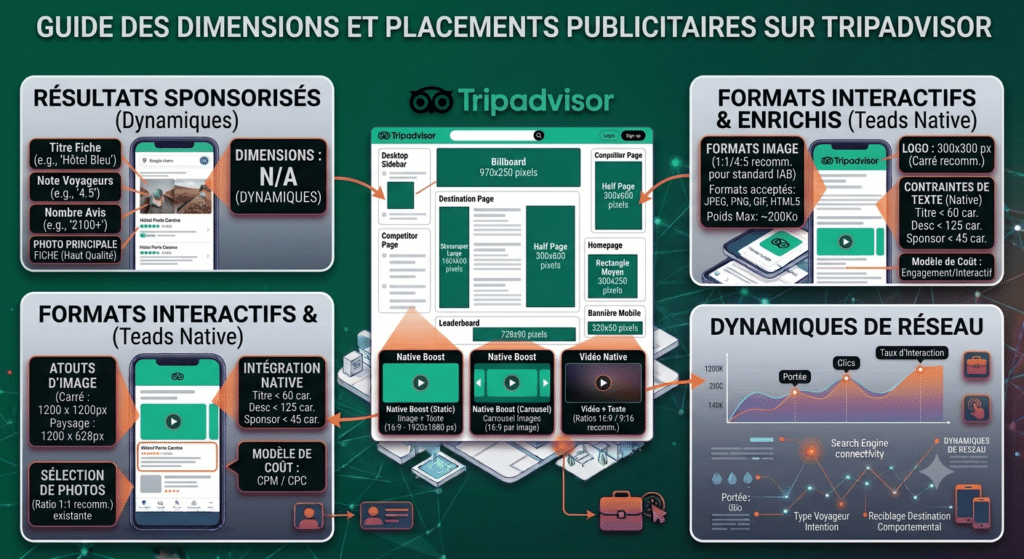
Here are the dimensions and technical specifications for the main advertising placements on the TripAdvisor platform.
Sponsored Listings
Unlike traditional banners, Sponsored Results do not require the provision of creative files in fixed dimensions.
- How it works: TripAdvisor generates these adverts dynamically. The platform retrieves the information directly from your existing TripAdvisor listing (your main photo, your title, your rating and your number of reviews).
- Dimensions: Therefore, there are no specific dimensions to provide. It is crucial, however, that the main photo on your profile be of high quality and representative.
Display Advertising (Banner Ads)
These are the standard banner formats (standard IAB) that appear in different places on the website (desktop and mobile) and the app.
| Placement / Ad Type | Dimensions (Width × Height in pixels) | Support |
| Medium rectangle (Medium Rectangle) | 300 × 250 | Computers & Mobile Phones |
| Leaderboard (Classic Banner) | 728 × 90 | Computer |
| Large Skyscraper Wide Skyscraper | 160 × 600 | Computer |
| Half Page Half-page | 300 × 600 | Computer |
| Billboard | 970 × 250 | Computer |
| Mobile banner Mobile Banner | 320 × 50 | Mobile |
- Technical notes: The accepted file formats are usually JPEG, PNG, GIF, and sometimes HTML5. The maximum file size is often limited (for example, 200 KB for static images).
Interactive and Enriched Formats (Native Boost & Video)
These formats are newer and aim for stronger engagement. They integrate in a more «native» way into the content.
| Listing type | Visual Specification | Recommended Dimensions / Ratio |
| Native Boost Static | An image + text (title, description). | 1920 × 1080 pixels (Ratio 16:9). |
| Native Boost Carousel | Several images scrolling in a carousel + text. | 1920 × 1080 pixels (Ratio 16:9) per image. |
| Native Video (Native Video) | A video + text (title, description). | Ratio 16:9 landscape or 9:16 (vertical). |
| Logo (Optional for Native formats) | Your brand logo. | 300 × 300 pixels Square. |
- Text constraints (Native Boost):
- Title : Max 60 characters.
- Description: Max 125 characters.
- Sponsor Name: Max 45 characters.
- Video Specifications:
- Duration: Often limited to 15 or 30 seconds.
- Format MP4 or MOV recommended.
- Weight: Limited (for example, less than 50 MB).
Far beyond the mentioned media: direct access to all professional DSPs
In addition to all the levers activated via the media already mentioned in this article, our agency has privileged access to leading professional programmatic buying platforms (DSPs), such as DV360 (Google), Teads, Asklocala, Azerion, or Mobsuccess. Backed by a strong technical partnership established with these players for several years, we work closely together to leverage the power of their proprietary technologies. This extensive network enables us to tap into premium media inventories and deploy ad targeting with surgical precision, thereby ensuring your messages reach the most qualified audiences with maximum relevance.
💡 The media buyer's tip
Don't try to tick all the boxes right from launch. To optimise your creative budgets, group your asset variations :
- A ratio 9:16 (Vertical) will work for TikTok, Instagram Reels, YouTube Shorts and Facebook Stories.
- A ratio 16:9 (Horizontal) will feed YouTube In-Stream and LinkedIn.
- A ratio 1:1 (Square) will work perfectly on Facebook, Instagram and Pinterest feeds.
- A ratio 4:5 (Rectangle) will also work perfectly on Facebook, Instagram and Pinterest feeds.